Checkout and register
Checkout with TWINT, card and cash — and a register that adds up
Close each visit in a few taps: services, products, tips and discounts on one ticket, paid however the client prefers. At the end of the day, the register knows exactly what came in.
30 days free · No credit card · Cancel anytime
Faster at the desk, calmer at month-end
Every way your clients pay
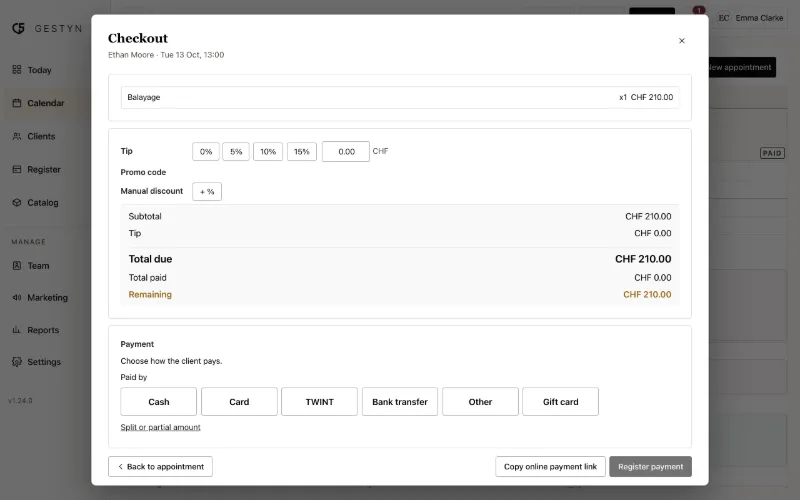
TWINT, card, cash, bank transfer, gift card, loyalty points or store credit — and one ticket can be split between several.
One ticket for everything
Services from the appointment, products from your shelf, a tip, a promo code or a discount. Prices and VAT come straight from your catalogue.
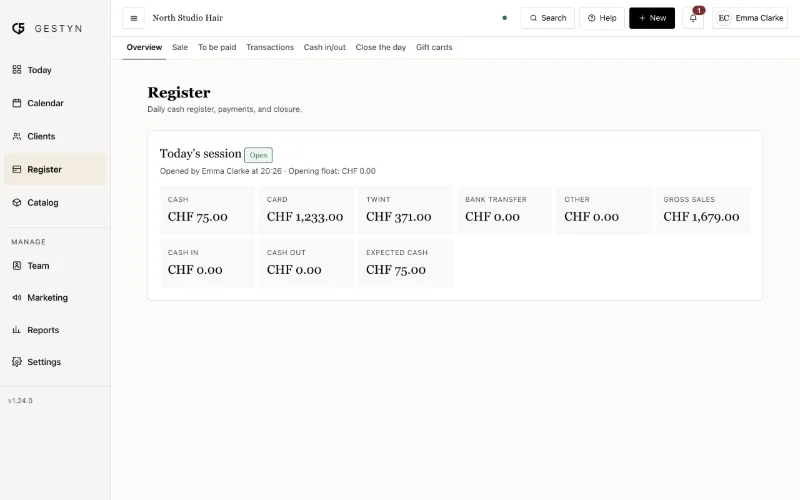
A register that balances
Each day has its own register: opening float, cash in and out, and a closing count that shows any difference. The first sale of the day opens it for you.
Bookkeeping without retyping
A VAT summary and an accounting export for your fiduciary. Refunds are deducted from every figure automatically.
How it works
Open the appointment
The services are already on the ticket. Add products, a tip or a discount.
Choose how they pay
Tap TWINT, card or cash — or split the amount. Gift cards and store credit are deducted on the spot.
Close the day
Count the cash, compare with what GESTYN expects, and close. Reports update themselves.
What's included
Card and TWINT payments at the desk are recorded in GESTYN alongside your existing terminal; online payments go through your own Stripe account.
- TWINT, card, cash, bank transfer and other payment methods
- Split payments across several methods
- Walk-ins added and checked out in seconds
- Product sales without an appointment
- Tips, manual discounts and promo codes
- Gift cards, loyalty points and store credit
- Refunds, with restocking of returned products
- Daily register with cash count, cash in and out
- VAT summary and accounting export
Frequently asked questions
Does GESTYN replace my card terminal?
No. Keep your terminal and your TWINT QR code; GESTYN records how each ticket was paid so your register and reports add up. Online payments — deposits, gift cards, shop orders — are paid by card or TWINT through your own Stripe account.
Can a client pay with two methods?
Yes. Split one ticket between, for example, a gift card and TWINT, or cash and card.
What if I forget to close the register?
Nothing is blocked: each day is independent and the next day's sales still go through. GESTYN reminds you of any day that is still open.
Can I give my fiduciary what they need?
Yes. The VAT summary and the accounting export are in every plan.
Try GESTYN free for 30 days
No credit card and no commitment. Set up your salon in an afternoon and start taking online bookings the same day.
30 days free · No credit card · Cancel anytime